Wednesday, 22, July, 2026

Hide Your Identity From TrueCaller
Hide Your Identity From TrueCaller

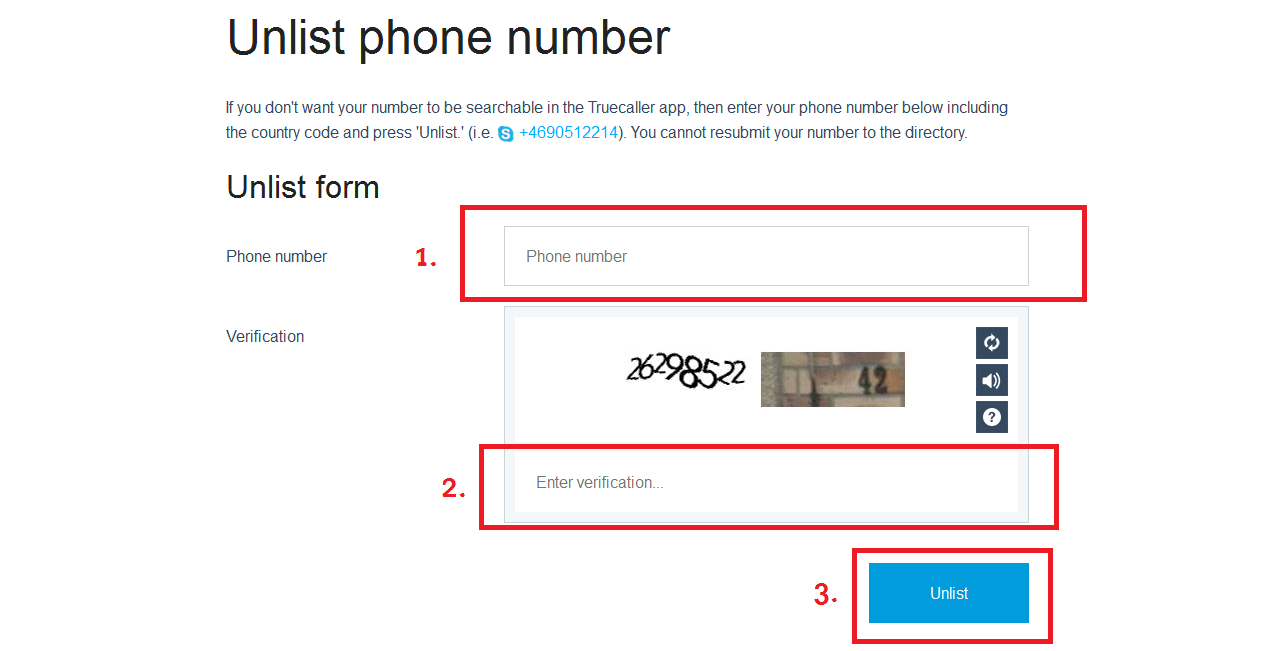
Step 1) Open link http://www.truecaller.com/unlist in your browser or simply click Here.Once you open the above mentioned link , you will find a basic form provided officially by Truecaller to Unlist your number from their directory so that it wont be searchable by other users. Step 2) Firstly you will have to fill your Phone Number which you want to remove from TrueCaller's directory. Number should be starting with the country code (For India it is +91) Step 3) Now you need to enter the captcha or verification code displayed aside that field. Finally click on the Unlist button situated below the form and done !! For making this more convenient here it is explained in following screenshot.
Share this Page: Facebook Twitter LinkedIn WhatsApp

Please Share Your Comments:

Khanewal Dot Com Logo

Khanewal.com.pk is a comprehensive local portal offering a blend of cultural insights, public service information, and entertainment resources for the Khanewal district.

Copyright © 2026. All Rights Reserved By:Khanewal.com.pk

Website Powered and Coded by: Soft Dot Com, Basic Templete Designed by HTML Codex

